analyst@windows-lab:~$ inspect windows/bruteforcing-windows-defender-exclusions
Bruteforcing Windows Defender Exclusions
A validated Windows lab showing how MpCmdRun.exe reveals a Defender-excluded directory through a distinctive skipped-scan response, with detection and mitigation guidance.
- Status
- Completed and validated
- Category
- Windows Security
- Type
- security research
- Difficulty
- Intermediate
- Estimated time
- 30–45 minutes
- Published
- 2 September 2026
- Last updated
- 2 September 2026
Controlled lab use only. This experiment intentionally creates a temporary Microsoft Defender exclusion. Perform it only in an isolated Windows virtual machine that you own or are explicitly authorized to test. Do not place payloads or malware in the excluded directory.
Executive summary
Microsoft Defender exclusions are normally protected configuration data because they identify locations that Defender does not scan in the usual way. Friends & Security documented an unusual discovery primitive: a custom scan launched through MpCmdRun.exe can reveal whether a candidate directory is excluded by returning a different result before it rejects a deliberately invalid path.
I reproduced the core behavior in a controlled Windows lab. I configured C:\Share as a Defender folder exclusion and submitted two otherwise equivalent custom-scan requests:
C:|*, where the base path was not excluded, returned0x80508023.C:\Share|, where the base path was excluded, returnedScanning C:\share| was skipped.
That response difference creates a simple yes-or-no oracle for a candidate directory. The technique does not add an exclusion, disable Defender or execute code. Its security value is discovery: an attacker who already has local execution could use existing exclusions to understand where file scanning has been intentionally reduced.
| Field | Value |
|---|---|
| Validation state | Core output oracle reproduced |
| Test platform | Isolated Windows VM with Microsoft Defender |
| Positive control | C:\Share configured as a folder exclusion |
| Negative control | C:</code> not configured as an exclusion |
| Payload | None |
| Primary telemetry | MpCmdRun.exe process creation and command line |
Research objective
The lab had four goals:
- Confirm that
MpCmdRun.exeaccepts a custom scan containing the deliberately invalid|*suffix. - Compare the result for a known excluded folder with a non-excluded path.
- Explain why the two outputs can be used to enumerate exclusions.
- Translate the behavior into practical detection and hardening guidance.
This is an exclusion-discovery experiment, not an antivirus-bypass test. No malicious file was created, downloaded or executed.
Evidence boundary
The following distinctions keep the article tied to the available evidence:
| Claim | Status |
|---|---|
C:\Share appeared in the Defender exclusion interface |
Observed in the supplied screenshot |
The excluded path returned was skipped |
Executed and observed |
The non-excluded path returned 0x80508023 |
Executed and observed |
| The output difference can classify a tested path | Validated by the positive and negative controls |
| The same test succeeds from a low-privilege session | Reported by Friends & Security and John Hammond; session integrity was not captured in my screenshots |
| Event ID 5007 exposed the exclusion in this VM | Not tested in this run |
| SharpExclusionFinder recursively discovered the path | Not executed in this run |
| A Sigma rule generated an alert in my environment | Proposed for follow-up; not tested in this run |
The exact Windows build, Defender platform version and PowerShell integrity level were not captured, so I do not infer them from the screenshots.
Lab environment and topology
The minimum topology is deliberately small:
Prerequisites
- A disposable Windows virtual machine.
- Microsoft Defender Antivirus enabled and active.
- Administrative access only for creating and removing the temporary exclusion.
- PowerShell for launching the two controlled scan requests.
- A VM snapshot taken before changing Defender configuration.
Keep the VM disconnected from production networks and do not reuse the excluded directory for other work.
Technical background
Defender exclusions
Microsoft Defender supports exclusions for files, folders, file types and processes. They are sometimes required for compatibility or performance, but every exclusion reduces visibility over the affected scope. That makes exclusion paths valuable discovery data.
An administrator can view or modify exclusions through Windows Security → Virus & threat protection → Manage settings → Exclusions. In normal use, access to the complete preference data is restricted. The original Friends & Security research also describes Event ID 5007 as a possible source of exclusion information because the event records Defender configuration changes.
Why the invalid suffix matters
The probe appends two characters to a candidate directory:
- The pipe character (
|) is invalid in a Windows filename. - The asterisk (
*) is a wildcard.
The Friends & Security researchers explain that Defender appears to evaluate the exclusion before it reaches normal path validation. If the base directory is excluded, the scan is skipped. If it is not excluded, processing reaches the malformed path and fails.
This produces the observable branch:
candidate base directory
├── excluded     → "was skipped"
└── not excluded → HRESULT 0x80508023
Step 1 — Establish the positive control
I created the lab folder C:\Share and added it as a folder exclusion through the Windows Security interface. The screenshot below captures both the configured exclusion and the corresponding skipped-scan result.
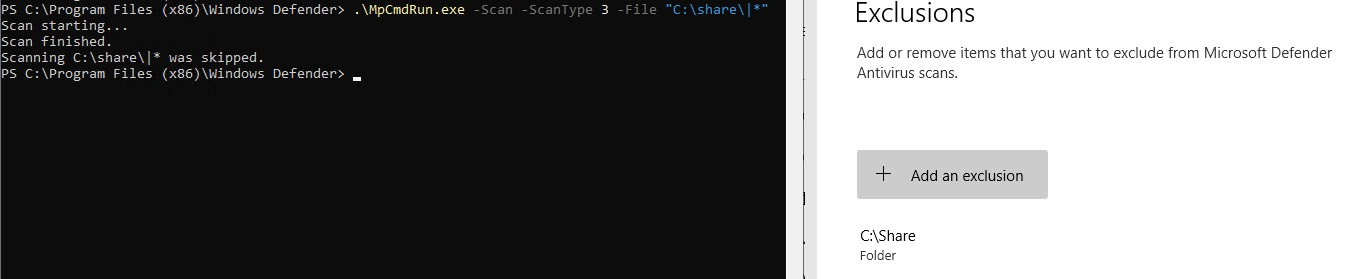
The exclusion is the experiment’s known positive control. Without a known excluded folder, a skipped response could not be validated against the Defender configuration.
Step 2 — Run the non-excluded control
In the lab VM, MpCmdRun.exe was launched from the installed Windows Defender directory. The first request tested the root of C:</code>, which was not configured as an exclusion:
.\MpCmdRun.exe -Scan -ScanType 3 -File "C:\|*"The important output was:
Scan starting...
CmdTool: Failed with hr = 0x80508023.
Check C:\Users\ADMINI~1\AppData\Local\Temp\MpCmdRun.log for more information
The error is expected in this experiment. The invalid pipe character prevents the argument from referring to a real file or directory.
Step 3 — Test the known exclusion
The second request changed only the base directory:
.\MpCmdRun.exe -Scan -ScanType 3 -File "C:\Share\|*"The observed output was:
Scan starting...
Scan finished.
Scanning C:\share\|* was skipped.
Windows paths are case-insensitive by default, so C:\Share in the interface and C:\share in the result refer to the same directory.
Parameter breakdown
| Argument | Purpose |
|---|---|
-Scan |
Starts a Microsoft Defender scan |
-ScanType 3 |
Requests a custom scan |
-File |
Supplies the path to test |
C:\Share |
Candidate base directory |
|* |
Deliberately malformed suffix that creates the output oracle |
The installed location of MpCmdRun.exe varies by Windows and Defender platform version. The supplied screenshot shows it being run from C:\Program Files (x86)\Windows Defender; current Microsoft documentation also describes the Defender platform directory under %ProgramData%\Microsoft\Windows Defender\Platform and the inbox %ProgramFiles%\Windows Defender fallback.
Validation and interpretation
The positive and negative controls produced different, repeatable classes of output:
| Tested path | Defender configuration | Observed result | Interpretation |
|---|---|---|---|
C:|* |
Not excluded | 0x80508023 |
The malformed target reached error handling |
C:\Share|* |
Excluded | was skipped |
Defender recognized the exclusion before scanning |
This validates the core oracle. It does not prove that every Defender release behaves identically, nor does it prove the privilege level of the shell used for these screenshots. Platform updates can change parsing, logging or access-control behavior, so defenders should reproduce the test against the versions they operate.
From one probe to brute-force discovery
Testing one known path is enough to validate the behavior. Turning it into enumeration means generating candidate directories and repeating the probe.
Friends & Security published SharpExclusionFinder, a C# utility that accepts a base directory and recursively tests subdirectories using this method. John Hammond’s demonstration showed that this approach creates a large number of short-lived MpCmdRun.exe processes.
I did not execute SharpExclusionFinder in this lab. That matters because recursive enumeration adds several unanswered variables: runtime, access-denied behavior, notification volume, process count and EDR response. Those are useful follow-up measurements, not results to assume.
Detection opportunities and defensive telemetry
The technique uses a legitimate Microsoft binary, but the command-line pattern and repetition are unusual.
High-value process signals
Monitor for:
MpCmdRun.exelaunched by an interactive shell such as PowerShell or Command Prompt.- A command line containing
-Scan -ScanType 3 -File. - The distinctive invalid suffix
|*. - Many
MpCmdRun.exeprocesses from the same user or parent process in a short interval. - Rapid changes to the tested path while the remaining arguments stay constant.
Process-creation telemetry from an EDR or Sysmon Event ID 1 is the most direct source. Defender scan events 1000, 1001 and 1002 may provide additional context, depending on the scan outcome and platform version.
Experimental Sigma starting point
The following rule is a defensive hypothesis derived from the observed command and John Hammond’s detection discussion. It was not validated in this lab and should be tested against local telemetry before deployment:
title: Potential Microsoft Defender Exclusion Enumeration via MpCmdRun
id: f3ba227d-c6d3-4f2d-9c22-59bef1ea74ea
status: experimental
description: Detects a malformed custom scan pattern associated with Defender exclusion discovery.
logsource:
  category: process_creation
  product: windows
detection:
  image:
    Image|endswith: '\MpCmdRun.exe'
  arguments:
    CommandLine|contains|all:
      - ' -Scan'
      - ' -ScanType 3'
      - ' -File'
      - '\|*'
  condition: image and arguments
falsepositives:
  - Authorized Defender troubleshooting or security testing
level: high
A second correlation rule should count repeated custom scans with different -File values. That captures automated enumeration even if an implementation changes the malformed suffix.
Event ID 5007
The alternative discovery surface discussed by the original research is:
Applications and Services Logs
└── Microsoft
    └── Windows
        └── Windows Defender
            └── Operational
Event ID 5007 indicates that Defender configuration changed. It is broader than exclusion changes, so defenders must inspect the old and new values rather than alerting on the ID alone. This log path was not reviewed as part of the supplied validation.
Defensive recommendations
- Minimize exclusions. Treat each one as a reduction in coverage that requires an owner, justification and expiration review.
- Avoid broad paths. Excluding a drive root, user-writable directory or shared staging folder creates unnecessary exposure.
- Control write access. If an exclusion is unavoidable, restrict who can create or modify files inside it.
- Monitor configuration changes. Review Defender Event ID
5007and correlate the changed value with administrative activity. - Monitor enumeration patterns. Alert on malformed custom scans and bursts of
MpCmdRun.exeprocess creation. - Retest after platform updates. The behavior depends on Defender’s evaluation order and may change.
- Do not treat an exclusion as a trusted zone. Application control, reputation, behavioral monitoring and EDR telemetry should still cover execution from excluded directories.
Cleanup and rollback
After collecting the two screenshots:
- Open Windows Security → Virus & threat protection → Manage settings → Exclusions.
- Select
C:\Shareand remove the temporary exclusion. - Delete the empty lab directory if it is no longer required.
- Confirm that Defender real-time protection remains enabled.
- Revert the VM to its pre-lab snapshot if a clean baseline is required.
An administrator can verify status after cleanup:
Get-MpComputerStatus |
  Select-Object AntivirusEnabled, RealTimeProtectionEnabled, BehaviorMonitorEnabled
The screenshot proves that the exclusion existed during validation, but cleanup evidence was not supplied. The steps above are therefore the required rollback procedure rather than a claim that cleanup was observed.
Troubleshooting and limitations
Every request returns an error
- Confirm that the positive-control directory is visibly listed in Defender exclusions.
- Preserve the trailing
|*exactly. - Verify that the same directory spelling is being tested.
- Confirm that Microsoft Defender is the active antivirus provider.
MpCmdRun.exe is not in the documented directory
Defender platform updates can move the current binary. Check the latest directory below:
%ProgramData%\Microsoft\Windows Defender\Platform\<platform-version>\The inbox fallback is commonly:
%ProgramFiles%\Windows Defender\A skipped-items notification appears
John Hammond observed that Defender may show a notification when a scan skips excluded content. That visible artifact is another reason this should not be described as stealthy.
Why not use Get-MpPreference?
Get-MpPreference is the supported administrative view of Defender preferences. The security-research question is whether observable scan behavior discloses one exclusion decision without granting the caller the complete preference list.
Security considerations
An exclusion is not a universal Defender or EDR bypass. It primarily affects the configured scanning scope. File creation, PowerShell activity, process execution, network connections, token activity and downstream behavior may still be visible to Defender for Endpoint, another EDR, Sysmon or centralized logging.
The experiment also demonstrates an important distinction:
discovering a reduced-visibility path ≠ obtaining code execution
discovering a reduced-visibility path ≠ disabling Defender
discovering a reduced-visibility path ≠ evading behavioral detection
The safe research value is understanding the information leak and building telemetry around it.
Key findings and lessons learned
- A deliberately malformed custom-scan path produced two distinct results based on whether the base directory was excluded.
C:\Share|returnedwas skipped, whileC:|returned0x80508023.- The technique uses a signed Defender utility but generates a recognizable command-line pattern.
- Automated recursion is likely noisy because it repeatedly launches
MpCmdRun.exe. - Existing exclusions should be treated as sensitive configuration and reviewed like firewall or application-control exceptions.
- Honest validation boundaries matter: the core oracle was reproduced, while low-privilege operation, recursive automation and detection alerts remain follow-up work.
Related portfolio research:
- LNK–HTA Polyglot Lab: Code Execution, Detection & Persistence
- Sliver C2 Lab: Netsh Helper DLL Persistence & Detection
References and attribution
- Friends & Security — Peeking Behind the Curtain: Finding Defender’s Exclusions
- Friends & Security — SharpExclusionFinder
- John Hammond — Bruteforcing Windows Defender Exclusions
- Microsoft Learn — Configure and manage Microsoft Defender Antivirus with MpCmdRun
- Microsoft Learn — Defender Antivirus scan issues and scan telemetry
- Microsoft Learn — Defender Antivirus event IDs and error codes